annbatch#
[!CAUTION] This package does not have a stable API. However, we do not anticipate the on-disk format to change in a fully incompatible manner. Small changes to how we store the shuffled data may occur but you should always be able to load your data somehow i.e., they will never be fully breaking. We will always provide lower-level APIs that should make this guarantee possible.




A data loader and io utilities for minibatching on-disk AnnData, co-developed by Lamin Labs and scverse
Getting started#
Please refer to the documentation, in particular, the API documentation.
Installation#
You need to have Python 3.12 or newer installed on your system. If you don’t have Python installed, we recommend installing uv.
To install the latest release of annbatch from PyPI:
pip install annbatch
We provide extras for torch, cupy-cuda12, cupy-cuda13, and zarrs-python.
cupy provides accelerated handling of the data via preload_to_gpu once it has been read off disk and does not need to be used in conjunction with torch.
[!IMPORTANT] zarrs-python gives the necessary performance boost for the sharded data produced by our preprocessing functions to be useful when loading data off a local filesystem.
Detailed tutorial#
For a detailed tutorial, please see the in-depth section of our docs
Basic usage example#
Basic preprocessing:
from annbatch import DatasetCollection

import zarr
from pathlib import Path

# Using zarrs is necessary for local filesystem performance.
# Ensure you installed it using our `[zarrs]` extra i.e., `pip install annbatch[zarrs]` to get the right version.
zarr.config.set(
    {"codec_pipeline.path": "zarrs.ZarrsCodecPipeline"}
)

# Create a collection at the given path. The subgroups will all be anndata stores.
collection = DatasetCollection("path/to/output/collection.zarr")
collection.add_adatas(
    adata_paths=[
        "path/to/your/file1.h5ad",
        "path/to/your/file2.h5ad"
    ],
    shuffle=True,  # shuffling is needed if you want to use chunked access, but is the default
)
Data loading:
[!IMPORTANT] Without custom loading via
annbatch.Loader.use_collection()orload_anndata{s}orload_dataset{s}, all columns of the (obs)pandas.DataFramewill be loaded and yielded potentially degrading performance.
from pathlib import Path

from annbatch import DatasetCollection, Loader
import anndata as ad
import zarr

# Using zarrs is necessary for local filesystem performance.
# Ensure you installed it using our `[zarrs]` extra i.e., `pip install annbatch[zarrs]` to get the right version.
zarr.config.set(
    {"codec_pipeline.path": "zarrs.ZarrsCodecPipeline"}
)


# WARNING: Without custom loading *all* obs columns will be loaded and yielded potentially degrading performance.
def custom_load_func(g: zarr.Group) -> ad.AnnData:
    return ad.AnnData(X=ad.io.sparse_dataset(g["layers"]["counts"]), obs=ad.io.read_elem(g["obs"])[some_subset_of_columns_useful_for_training])


# A non empty collection
collection = DatasetCollection("path/to/output/collection.zarr")
# This settings override ensures that you don't lose/alter your categorical codes when reading the data in!
with ad.settings.override(remove_unused_categories=False):
    ds = Loader(
        batch_size=4096,
        chunk_size=32,
        preload_nchunks=256,
    )
    # `use_collection` automatically uses the on-disk `X` and full `obs` in the `Loader`
    # but the `load_adata` arg can override this behavior
    # (see `custom_load_func` above for an example of customization).
    ds = ds.use_collection(collection, load_adata=custom_load_func)

# Iterate over dataloader (plugin replacement for torch.utils.DataLoader)
for batch in ds:
    data, obs = batch["X"], batch["obs"]
[!IMPORTANT] For usage of our loader inside of
torch, please see this note for more info. At the minimum, be aware that deadlocking will occur on linux unless you passmultiprocessing_context="spawn"to thetorch.utils.data.DataLoaderclass.
In Depth#
Let’s go through the above example:
Preprocessing#
colleciton = DatasetCollection("path/to/output/store.zarr").add_adatas(
    adata_paths=[
        "path/to/your/file1.h5ad",
        "path/to/your/file2.h5ad"
    ],
    shuffle=True,  # shuffling is needed if you want to use chunked access
)
First, you converted your existing .h5ad files into a zarr-backed anndata format.
In the process, the data gets shuffled and is distributed across several anndata files.
Shuffling is important to ensure model convergence, especially because of our contiguous data fetching scheme which is not perfectly random.
The output is a collection of sharded zarr anndata files, meant to reduce the burden on file systems of indexing.
See the zarr docs on sharding for more information.
Data loading#
Chunked access#
# `use_collection` will automatically get everything in `X` and `obs` and yield it.
ds = Loader(
    batch_size=4096,
    chunk_size=32,
    preload_nchunks=256,
).use_collection(collection)

# Iterate over dataloader (plugin replacement for torch.utils.DataLoader)
for batch in ds:
    x, df, index = batch["X"], batch["obs"], batch["index"]
The data loader implements a chunked fetching strategy where preload_nchunks number of continguous-chunks of size chunk_size are loaded.
chunk_size corresponds the number of rows of anndata store to load sequentially.
For performance reasons, you should use our dataloader directly without wrapping it into a torch.utils.data.DataLoader.
Your code will work the same way as with a torch.utils.data.DataLoader, but you will get better performance.
In order to take advantage of the sharded zarr files performance, though, locally, you must set the codec pipeline to use zarrs-python when reading.
Using zarr on its own will not yield high performance for local filesystems.
We have not tested remote data (i.e., using zarr.open() with a zarr.storage.ObjectStore) but because we use zarr, this data loader should also work over cloud connections via relevant zarr stores.
Note that zarrs-python cannot be used with these sorts of non-local stores.
User configurable sampling strategy#
We support user-configurable sampling strategies like weighting or sampling by implementing the abstract annbatch.abc.Sampler.
Please open an issue if you want to contribute a new sampler to this repo.
Speed comparison to other dataloaders#
We provide a speed comparison to other comparable dataloaders below:
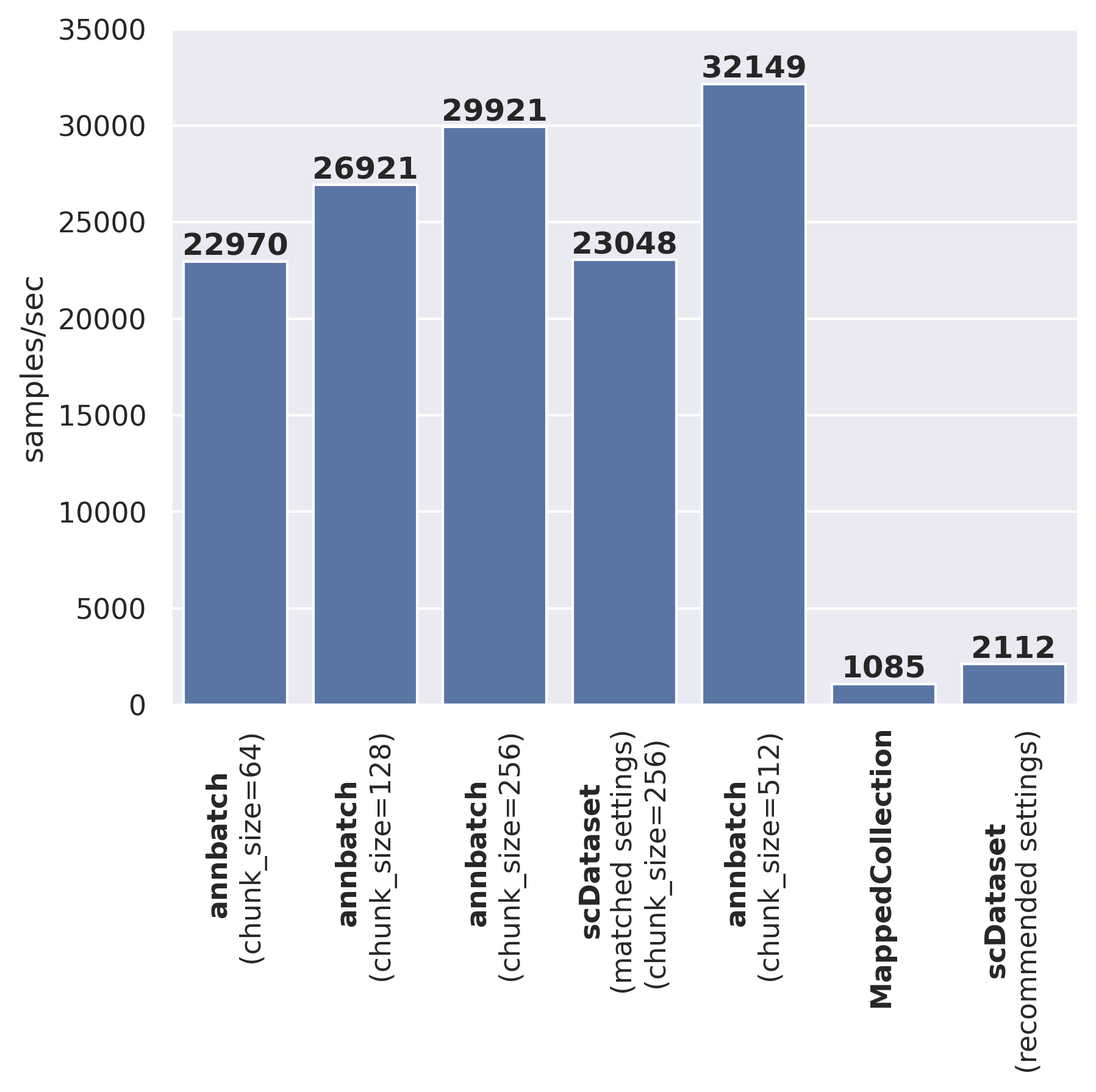
We’ve run the above benchmark on an AWS ml.m5.8xlarge instance.
The code to reproduce the above results can be found on LaminHub:
Why data loading speed matters?#
Most models for scRNA-seq data are pretty small in terms of model size compared to models in other domains like computer vision or natural language processing. This size differential puts significantly more pressure on the data loading pipeline to fully utilize a modern GPU. Intuitively, if the model is small, doing the actual computation is relatively fast. Hence, to keep the GPU fully utilized, the data loading needs to be a lot faster.
As an illustrative, example let’s train a logistic regression model (notebook hosted on LaminHub). Our example model has 20.000 input features and 100 output classes. We can now look how the total fit time changes with data loading speed:
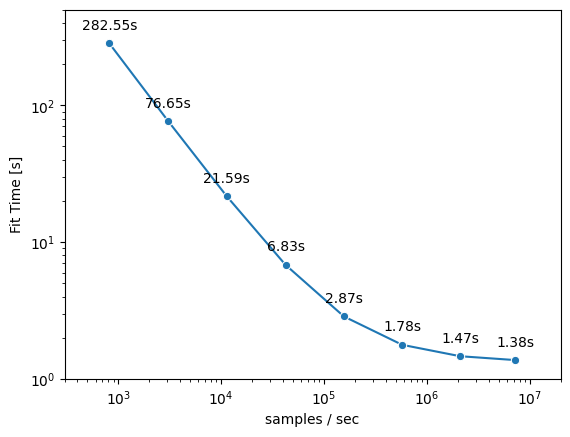
From the graph we can see that the fit time can be decreased substantially with faster data loading speeds (several orders of magnitude). E.g. we are able to reduce the fit time from ~280s for a data loading speed of ~1000 samples/sec to ~1.5s for a data loading speed of ~1.000.000 samples/sec. This speedup is more than 100x and shows the significant impact data loading has on total training time.
When would you use this data laoder?#
As we just showed, data loading speed matters for small models (e.g., on the order of an scVI model, but perhaps not a “ foundation model”).
But loading minibatches of bytes off disk will be almost certainly slower than loading them from an in-memory source.
Thus, as a first step to assessing your needs, if your data fits in memory, load it into memory.
To accelerate reading the data into memory, you may still find zarrs-python in conjunction with sharding still helpful in the same way it accelerates io here.
To this end, please have a look at this gist comparing file loading speeds between anndata.io.read_zarr() and anndata.io.read_h5ad().
It highlights how zarrs-python and sharding can help there as well.
However, once you have too much data to fit into memory, for whatever reason, the data loading functionality offered here can provide significant speedups over state of the art out-of-core dataloaders.
Release notes#
See the changelog.
Contact#
For questions and help requests, you can reach out in the scverse discourse. If you found a bug, please use the issue tracker.